Inputs and access
Use an Autodesk Construction Cloud project with issues you are permitted to read, the relevant model in Frame, Power BI Desktop, and access to the ACC issues template. Frame and Autodesk permissions are separate. A public sample is available above; it does not grant access to another project’s issues.
Set up the ACC issues report
- Connect your Autodesk account in Frame and select the project and model you need. Follow the ACC-to-Power-BI guide.
- Prepare the model’s report data and sync its issues. Confirm a known issue is visible in Frame before opening Power BI.
- Choose the ACC issues template for that model, create the report, and open the downloaded
.pbitin Power BI Desktop. - Complete the connection prompts and refresh the tables.
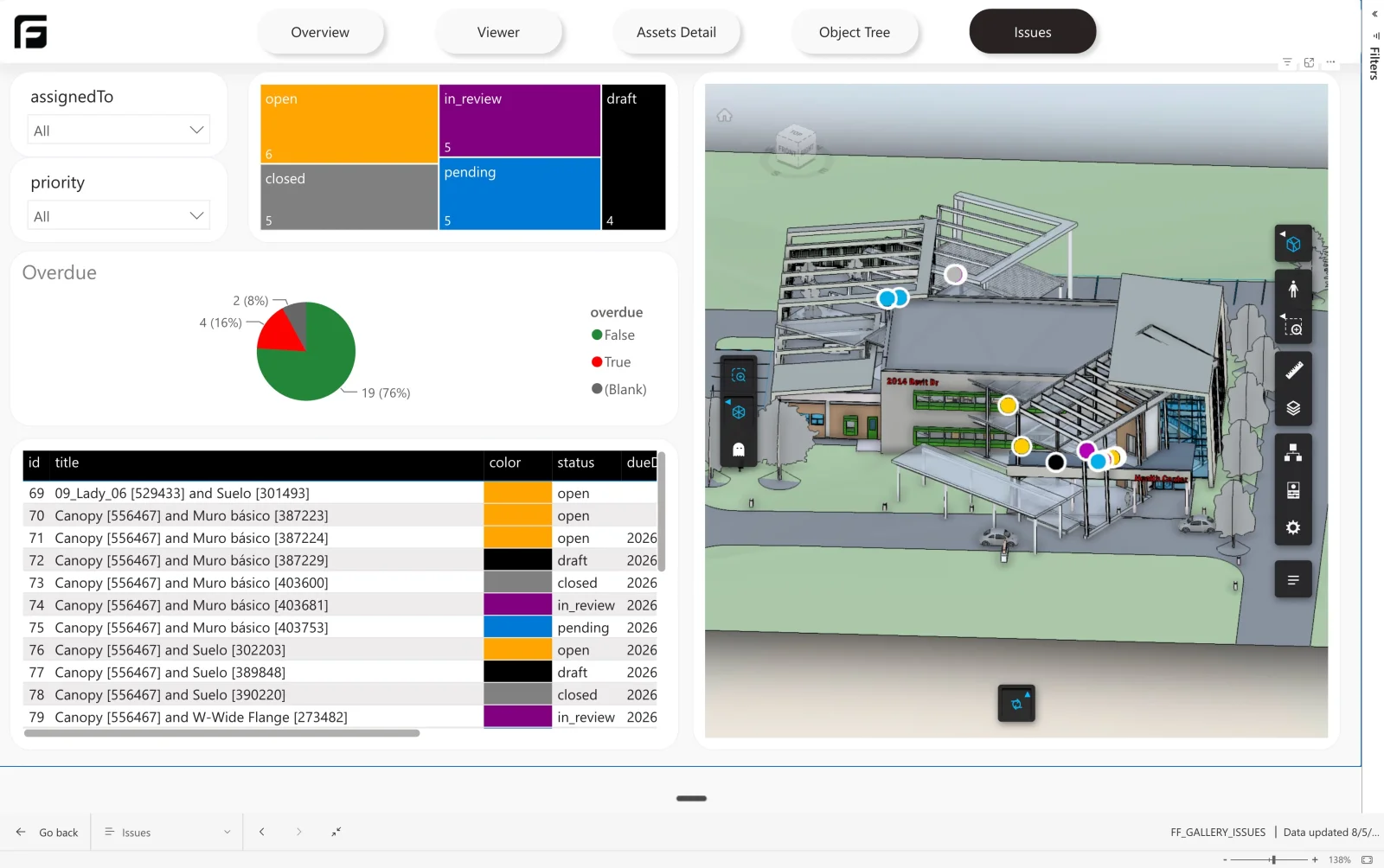
- Compare issue status and due dates with the source project. Select an issue with a known model reference to check the viewer marker.
Refresh and interpretation
Issue ingestion and Power BI refresh are separate. Webhooks can trigger supported sync workflows, but an already-open report does not continuously repaint itself. Refresh the report after the issue dataset updates.
Some issues have no model reference or coordinates. They can still contribute to tables and counts without a 3D marker. Aging and overdue measures depend on usable dates and your chosen status rules. Use the federated report example when reviewing multiple models, and check plans and access for your project.
How Frame builds it
Raised in ACC, already in the report