Build a quantity table
Select a processed model in the BIM Frame add-in, export the properties you need, and summarize quantities with Excel pivot tables. Keep element identifiers so you can trace rows to the model.
Set up the Excel add-in →Frame for Excel
Bring Revit, IFC, and Autodesk model data into Excel tables. Analyze quantities, add project fields, and check the elements behind each row.
Frame supercharges Excel to not only display model data but interact with it, bridging the gap between field workflows and advanced project analytics.
One workflow, two tools. Sync Excel and Power BI around shared BIM data, so updates in one reflect instantly in the other.
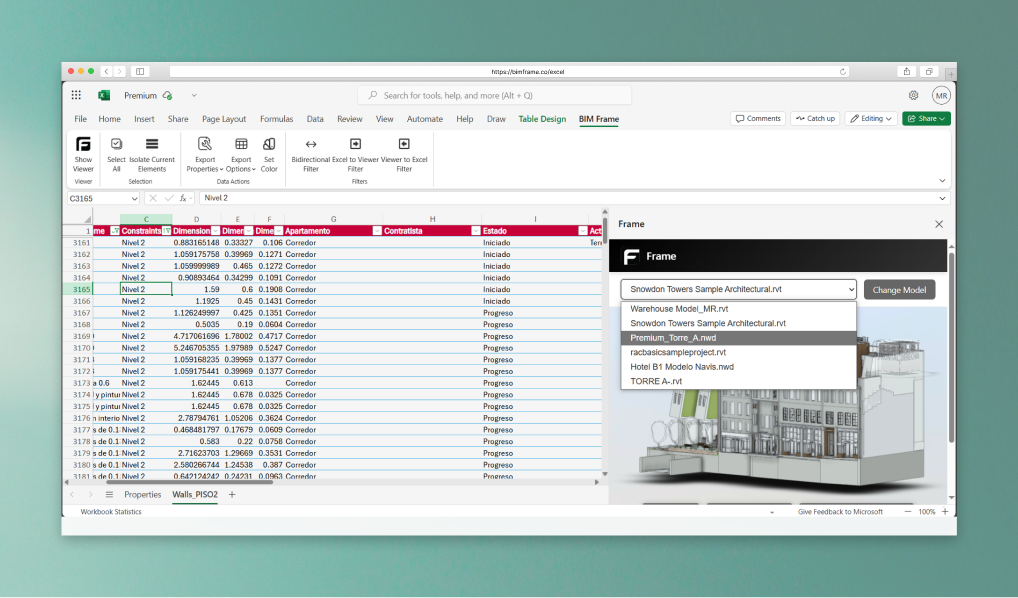
Work with any model, anywhere. Switch between your uploaded models and edit data, all from Excel.
Select a processed model in the BIM Frame add-in, export the properties you need, and summarize quantities with Excel pivot tables. Keep element identifiers so you can trace rows to the model.
Set up the Excel add-in →Use your own columns and formulas for rates, work packages, or review notes. These spreadsheet fields support your reporting workflow; they do not automatically change the source Revit file.
Explore the Excel example →Load the updated model in the add-in and refresh the exported table. Refresh is in beta: clear active table filters first, then review changed rows before reusing your totals.
Follow the refresh workflow →Combine your model dataset with Excel project inputs in Power BI. Match records with stable model and element identifiers, check units, and refresh each data source before publishing a report.
Build a construction-control dashboard →You need Excel with Office add-in support, a Frame account, and a model available in Frame. Check plan access before connecting your project. Frame works with model properties; it is not a replacement for native Revit schedule export or a parameter write-back tool.
Hear from industry professionals who have transformed their workflows with our BIM analytics platform.
"Frame's Excel integration let our project managers and cost planners work with BIM models directly in-field, using the tool they already know. It's exactly the bridge we needed."
with model context.
Use your favorite Excel functions and formulas to explore and manipulate BIM data in 3D.
Export model properties, define new ones, and build pivot tables in Excel.
Apply filters in Excel or the model viewer, with results synced both ways.
Use Excel's conditional formatting to color-code your model by any field.
Infrastructure you can rely on. Support your team deserves.
The security that your mission-critical application needs.
Always-on infrastructure designed for global scale and uninterrupted access.
End-to-end encryption and secure cloud storage for your project data.
Fast SLAs and a dedicated Slack channel for expert support.
Discover the benefits of Frame today.