Automate Model Checking: The New BIM Health Dashboard Template
Reduce validation times and improve model quality. Learn how to visualize Autodesk Validation Tool results with our new 3D Health Dashboard Template.

Frame Team
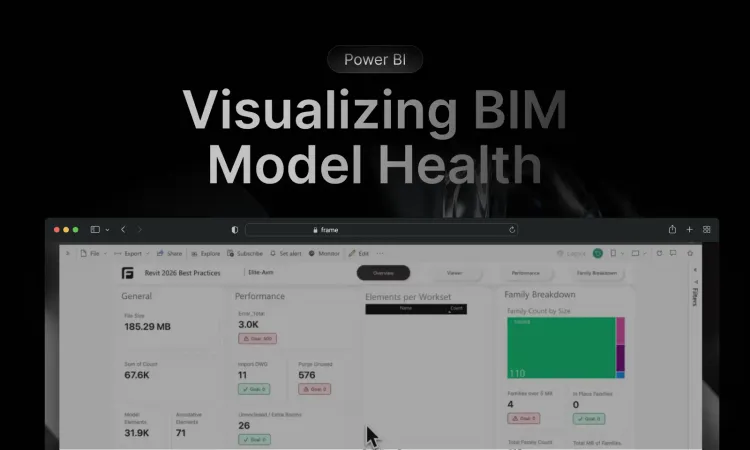
Introduction: The Cost of Poor Data Quality
In the world of BIM, data quality is everything. A model filled with warnings, duplicate elements, or non-compliant families isn’t just “messy”—it’s a liability. It leads to incorrect quantity take-offs, coordination clashes, and eventually, expensive change orders on site.
However, performing a comprehensive BIM health check has traditionally been a slow, manual process. BIM Managers spend countless hours running audits, exporting HTML reports from Revit, or manually checking lists of IDs.
At Frame, we believe validation should be continuous, automated, and visual. That’s why we are excited to release our new BIM Health Dashboard Template. This tool is designed to streamline your Revit model health workflows and make model checking accessible to the entire project team.
The Power of the Autodesk Validation Tool
To automate the “checking” part of the process, we highly recommend the Autodesk Validation Tool (AVT).
The AVT is a cloud-based service that allows you to automate model checker routines on files stored in Autodesk Construction Cloud (ACC) or BIM 360. It runs in the background, checking your models against your standards without tying up your local machine.
Learn more about the tool here: Autodesk Validation Tool
Visualizing Health with Frame: Adding the Missing Context
While AVT is powerful for generating the data, users often run into a critical bottleneck: Context.
Model health checks shouldn’t be a guessing game. It’s great to know you have 50 “Duplicate Elements” or “Views not on Sheets,” but it is much harder to fix them when you are just staring at a spreadsheet of Element IDs.
This is where the Frame Health Dashboard changes the game.
We have built a Power BI template that feeds your AVT data directly into the interactive Frame Viewer. We aren’t just “reporting” on health anymore; we are interactively analyzing it.
Unlike standard connectors that require complex setup, Frame allows you to:
- Plug in AVT results directly.
- Visualize the data instantly in the 3D viewer.
- Isolate issues like “Unconnected Elements” visually in seconds.
Checks that used to take an hour of hunting through IDs can now be resolved in minutes.
Key Features of the Template
We have designed this dashboard to give you an immediate “pulse” of your project’s health:
- Model Score: A high-level KPI tracking the overall compliance of the model.
- Warnings Overview: Breakdown of warnings by severity and category.
- Family Compliance: Identify non-standard naming conventions or unapproved families.
- 3D Context: The most important feature. When you filter for “Duplicate Elements,” Frame isolates them in the viewer so you can see exactly what needs to be fixed.
How It Works
Setting up your BIM Health Dashboard with Frame is designed to be seamless, whether you work with local files or directly from the cloud.
- Prepare the Data: First, configure and run your checkset in the Autodesk Validation Tool (AVT) on your ACC project. This generates the essential Excel report (
.xlsx) containing your model’s health data and warnings. - Upload Your Model:
- Local: Upload your Revit (
.rvt) file directly to the Frame web app. - Cloud: Connect your Autodesk Construction Cloud (ACC) account to stream models directly from your docs without manual uploads.
- Local: Upload your Revit (
- Select the Template: Once your model loads, Frame will prompt you to select a dashboard template. Choose the Health Dashboard option to start.
- Connect the AVT Data: The template will ask for the data source. Simply upload the Excel file you exported from AVT in step 1.
- Analyze in Context: Frame instantly links the Excel data to your 3D model elements. You can now click on any warning bar chart or list item to isolate those specific elements in the viewer, providing the context needed to fix issues fast.
Summary
Improving Revit model health doesn’t mean working harder; it means working smarter. By combining the automation of the Autodesk Validation Tool with the visual storytelling of Frame and Power BI, you can turn model checking from a chore into a strategic advantage.
Ready to clean up your models?