Autodesk Viewer: Free 3D Model Viewing and Power BI Workflows
Learn how Autodesk Viewer works, where it is useful, and when BIM teams need Frame's viewer for Power BI, saved views, colors, markers, and model analytics.

Frame Team
Introduction
If you work in architecture, engineering, or construction, you’ve likely come across the Autodesk Viewer, a free online viewer that lets you open and explore 2D and 3D models directly in your browser. Despite being one of Autodesk’s simplest tools, it’s often underrated.
From our experience working with clients and non-technical stakeholders, Autodesk Viewer is an excellent entry point to BIM visualization. Something as simple as seeing a 3D model online, rotating it, and adding comments or markups can completely change how people understand and interact with project data. For many, it’s the first time BIM “clicks,” transforming abstract files into something tangible and collaborative.
At Frame, we see Autodesk Viewer as a gateway to the world of connected BIM intelligence, and a perfect starting point for demonstrating how accessible and impactful model-based collaboration can be.
Is Autodesk Viewer Secure and Free?
Yes and yes. Autodesk Viewer is completely free and secure to use online. You don’t need to install any software, and your files remain private unless you explicitly share them.
When you upload a model (such as a Revit, DWG, or IFC file), Autodesk processes it on its secure cloud platform. Once converted, you can view, navigate, and annotate your 3D model in any modern web browser.
If you’re looking for a free 3D online viewer for quick access or client presentations, Autodesk Viewer is one of the safest and most accessible tools available.
If you want to take things further and explore advanced BIM intelligence features like AI-powered annotations and business intelligence integration, check out our Frame viewer capabilities below. Discover how our Frame BIM Viewer transforms basic model viewing into powerful data intelligence.
Current Limitations: What Happens After 30 Days?
While Autodesk Viewer is great for quick sharing, it’s not meant for long-term hosting. Uploaded models typically expire after 30 days unless re-uploaded. This means it’s best suited for temporary visualization and short review cycles rather than ongoing collaboration.
You also can’t edit the model data, customize dashboards, or integrate it with analytics, it’s purely for viewing and markup.
Can You Use Autodesk Viewer in Power BI?
The short answer is: not the free Autodesk Viewer as a long-term reporting surface.
Autodesk Viewer is excellent for temporary viewing, sharing, and markup. A Power BI dashboard needs a different kind of viewer workflow. It needs stable model identifiers, report-ready datasets, saved views, color states, isolated element sets, and interaction between model selections and outside Power BI visuals.
That is the gap Frame focuses on. Frame’s Power BI viewer is based on Autodesk Viewer technology, then extended for BIM reporting. A Revit or ACC/Forma model can sit beside charts, tables, issue metrics, model health checks, and quantity views. Selecting a chart can isolate objects in the model. Selecting objects in the viewer can drive report context.
For the deeper workflow, see Autodesk Viewer in Power BI: Custom BIM Models Inside Reports.
How Does Autodesk Viewer Work?
Autodesk Viewer lets users upload design files such as DWG, DWF, RVT, IPT, STEP, IGES, STL, OBJ, and PDF. After logging in or accessing the website, files can be uploaded by clicking the Upload button or by dragging and dropping them into the browser, where they are securely stored on Autodesk’s cloud servers. Users can view the files in 2D or 3D, navigate models using orbit, pan, zoom, and switch between different views like floor plans or sections. Designs can be shared by generating a link, which recipients can use to interact with the file without signing in or installing anything.
What Are the Capabilities of Autodesk Viewer?
Autodesk Viewer offers a range of powerful collaboration and review features:
- Extensive file format support: Over 80 supported file types, including DWG, DXF, DWF, RVT, IPT, IAM, STEP, IGES, STL, OBJ, and PDF
- Browser-based access: No installations required; accessible from any device with internet, including desktops, tablets, and smartphones
- Collaboration tools: Users can add comments, markups, measurements, and notes directly to the designs. Others can respond or add their own annotations, supporting real-time feedback
- Navigational controls: Zoom, pan, rotate, orbit, and section views help users explore models in detail
- Measurement tools: Facilitate precise checks of distances, angles, and areas within models
- Sharing and access control: Generate secure links for viewing and collaboration; shared files can be accessed only by those with the link or permissions
- Viewing options: Customize display, toggle layers, show/hide elements, switch backgrounds, and view different perspectives
- No model editing: Viewer is for reviewing and feedback only, not for changing designs
- Cross-discipline support: Ideal for architecture, engineering, and construction projects, and for presenting to clients, consultants, or contractors
Removing or Deleting Comments
To delete a comment in Autodesk Viewer:
- Locate the comment in the Comments window.
- Right-click the comment and select “Delete Comment” from the menu.
Note: Only the user who posted a comment can remove it; editing or removing other users’ comments is restricted for security and collaboration reasons.
Best Free Autodesk Viewer Alternatives
Here are some of the best free alternatives to Autodesk Viewer in 2025:
Scroll horizontally to see all columns.
| Alternative | Key Features | Platform | Best For |
|---|---|---|---|
| Bentley View | Supports 50+ file formats, 3D model viewing, precise measurement, print fidelity | Desktop | Robust free CAD viewer for DWG/DXF files with advanced viewing |
| Onshape | Cloud-based, real-time collaboration, professional CAD tools | Browser-based | Team collaboration and cloud CAD |
| FreeCAD | Open source, parametric 3D modeling, supports many formats | Desktop | Full 3D CAD modeling |
| LibreCAD | Open source, 2D drafting, supports DWG/DXF | Desktop | 2D drafting and technical drawings |
| CADDaddy | Online CAD file viewing and sharing, supports 2D/3D | Browser-based | Quick file viewing and sharing online |
| DWGSee | DWG file viewer alternative with annotation features | Desktop | View and annotate DWG files |
| DraftSight | DWG editor and viewer, cross-platform | Desktop | Professional DWG editing |
| Frame | Frame agent in the viewer, Power BI/Excel integration | Browser-based | Advanced BIM & BI |
These alternatives offer diverse options:
Desktop Solutions: Bentley View, FreeCAD, LibreCAD, DWGSee, and DraftSight provide robust offline CAD tools for professional drafting, 3D modeling, and DWG file handling.
Cloud-Based Options: Onshape, CADDaddy, and Frame deliver online collaboration and quick file sharing without installations, ideal for teams and educational use.
Specialized Tools: From comprehensive 3D parametric modeling (FreeCAD) to simple online viewing (CADDaddy) and advanced BIM intelligence (Frame), these alternatives cover everything from basic file viewing to advanced CAD design workflows and business intelligence integration.
Capabilities of Frame Viewer: Taking Autodesk Viewer Further
Frame Viewer Demo Video
Frame builds on the simplicity of Autodesk Viewer and brings it into the world of data intelligence.
Here’s what you can do with Frame’s viewer:
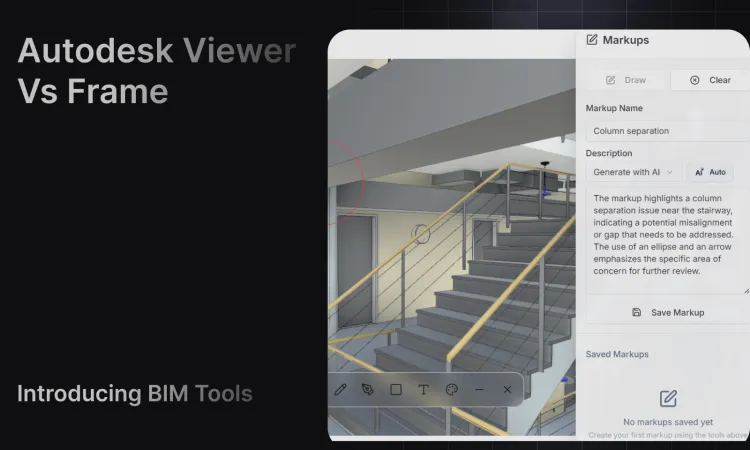
- Draw Annotations and Markups – Highlight issues, observations, or progress directly on the 3D model
- Share Models and Comments – Collaborate in real time with your team or clients
- AI-Powered Annotations – Draw a markup and let AI draft or improve its description from a screenshot of the model, on every plan. On paid plans the Frame agent can also isolate, colour, section and count elements from a plain-language request (Learn more about the Frame agent)
- Connect with Power BI and Excel – Combine BIM geometry with performance metrics, cost data, or schedules for fully interactive dashboards (Power BI BIM | Excel BIM)
- Save Views, Colors, and Isolated Elements – Preserve the exact review context your team used in a meeting, then reopen that state later inside the same model workflow
- Support Larger Model Workflows – Prepare the model data before it reaches Power BI so Revit, IFC, Navisworks, and ACC/Forma projects can become usable dashboard datasets
- Work Beyond 30 Days – Keep models hosted, searchable, and connected across project phases
Frame transforms a simple online viewer into a business intelligence platform, helping you move from static visualization to actionable insight.
Summary
Autodesk Viewer remains one of the most accessible and underrated tools for exploring 3D models online. It’s secure, free, and perfect for introducing clients to the value of BIM. However, for long-term collaboration, analytics, and integration with business tools, platforms like Frame’s BIM Viewer extend those capabilities dramatically.
Conclusion
If your goal is simply to view and share 3D models online, Autodesk Viewer is a fantastic free solution. But if you want to connect your BIM data with your business intelligence tools, visualize project KPIs, and make data-driven decisions from your 3D models, that’s where Frame’s BIM platform shines with its Frame agent, Power BI integration, and Excel connectivity.